
Office Move in Washington, DC? An IT Relocation Checklist
How Do You Plan the IT Side of an Office Move in Washington, DC?
Start with the internet circuit, because it has the longest lead time and nothing else works without it. A successful IT relocation runs on a 90-day timeline: order connectivity first, survey the new space second, and move people only once their phones, Wi-Fi, printers and conference rooms have been tested in the new office.
Moves in the District add their own constraints — building management approvals, freight elevator windows, loading dock schedules and vendor insurance requirements that can stall a move weekend if they are discovered late. Whether you are consolidating offices, moving across the river to Virginia, heading out to Maryland or opening a second location, this checklist is the plan we use for IT support in Washington, DC relocations.

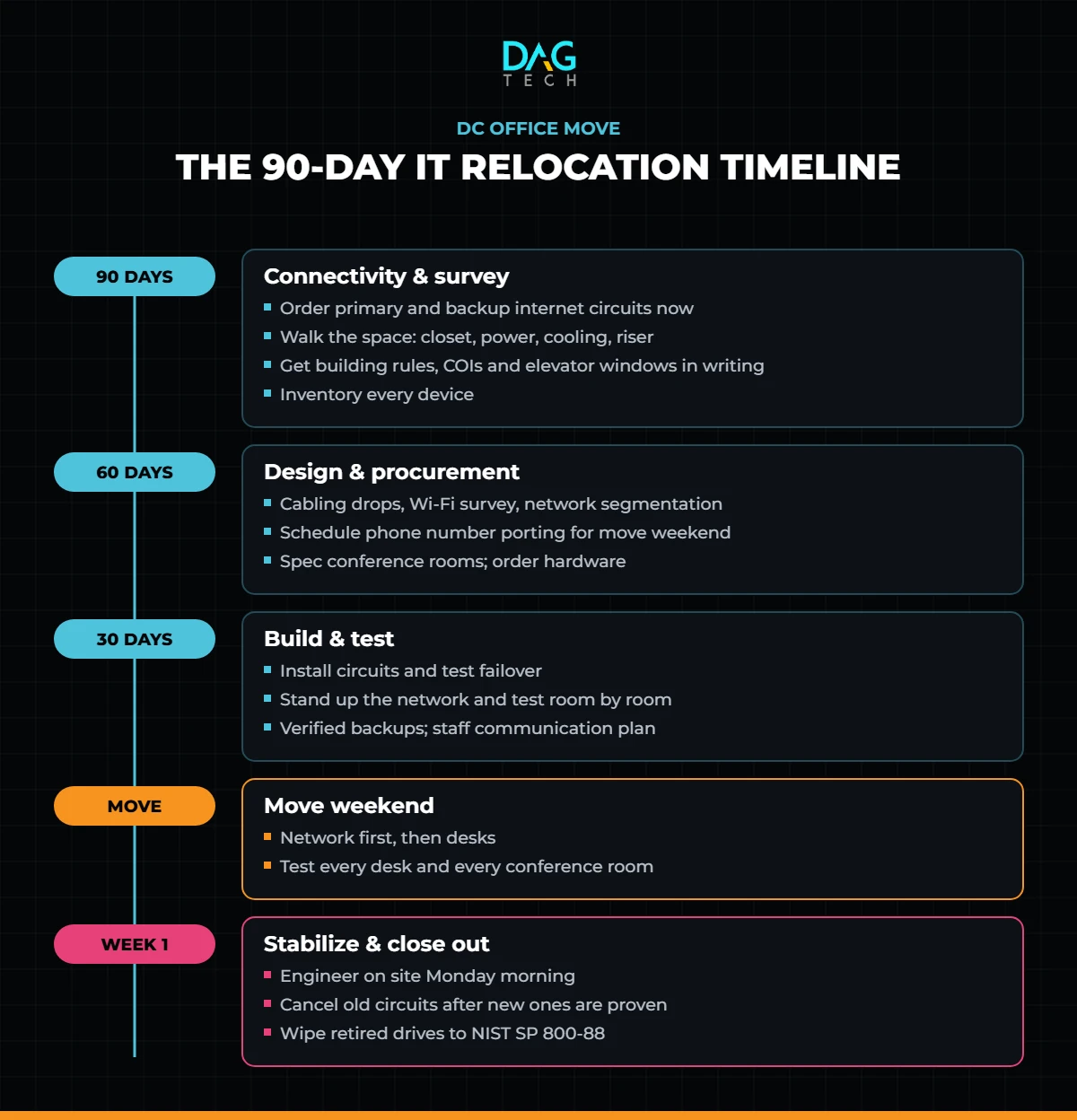
The 90-Day Timeline at a Glance
90 Days Out: Connectivity and the Survey
- Order internet service immediately. New fiber circuits commonly take 60 to 90 days to install, longer if construction is needed. Order a primary and a backup circuit from different carriers.
- Walk the new space with your IT provider. Locate the server or network closet, check power and cooling, and confirm where the building’s riser and demarcation point are.
- Get building rules in writing. Most commercial buildings require certificates of insurance from every vendor, approved move windows and elevator reservations. Collect them now.
- Inventory everything. Every laptop, desktop, monitor, printer, phone, switch and access point — and decide what moves, what is replaced and what is retired.
- Decide what should not move at all. A move is the right moment to retire the server in the closet. Moving files and applications to cloud managed services first means there is less to carry and less that can break.
The internet circuit is the long pole in every office move. Order it before you sign the furniture contract.
60 Days Out: Design and Procurement
- Design the network. Plan cabling drops, a Wi-Fi survey for access point placement, separate networks for guests and devices, and next-generation firewall configuration for the new circuits. Our guide to network performance covers the design principles.
- Plan phones and numbers. Porting phone numbers takes time; schedule it to complete on move weekend, not before.
- Specify conference rooms. Displays, cameras, microphones and booking panels need power and network drops placed before walls close.
- Order hardware. Anything new — switches, access points, docking stations, displays — should arrive at least two weeks before the move so it can be configured and tested.
- Coordinate access control. Badge readers, cameras and alarm systems often depend on the same network and need to be ready on day one.

30 Days Out: Build and Test
- Install and test the circuits. Confirm both connections work and fail over automatically.
- Stand up the network. Install switches, firewalls and access points in the new space and test coverage room by room.
- Back everything up. Take verified backups of every server and any data that still lives on local machines, and confirm your BCDR plan covers the move window.
- Secure remote access. Expect more people working from home during the move; make sure every remote login is protected with multifactor authentication.
- Communicate the plan. Tell staff what to pack, what IT will handle, when systems will be down and who to call on Monday morning.
Move Weekend
- Shut down and label equipment with its destination desk or rack position.
- Move network and server equipment first, bring it online, and confirm internet, phones and remote access before workstations arrive.
- Set up and test every desk: power, network, docking station, monitors, phone and printer.
- Test conference rooms end to end with a real call.
The First Week
- Keep an engineer on site for the first morning to catch the issues people find when they sit down.
- Close out the old space: remove equipment, cancel old circuits after the new ones are proven, and return carrier hardware.
- Retire old devices properly. Drives should be sanitized or destroyed following NIST SP 800-88 media sanitization guidelines, with certificates of destruction.
- Update documentation: network diagrams, circuit IDs, vendor contacts and the asset inventory.
FEMA’s Ready Business program is a useful companion for the non-IT side of continuity planning during a move.
A good office move is invisible: people leave on Friday and sit down to working technology on Monday.
Where DAG Tech Fits
Office relocations are a core part of DAG Tech’s IT project services. We manage carriers, cabling vendors, building management and move-weekend cutover, source the hardware through our IT procurement services, and keep everything running afterward through managed IT services with an 8-minute average helpdesk response — so the move happens on one plan with one accountable team.
Contact DAG Tech today to plan your IT relocation — we deliver proposals within one business day.
Related reading: How to Choose an IT Company in Washington, DC · CMMC and NIST 800-171: What DC-Area Government Contractors Still Owe · What Is a BCDR Policy, Runbook and Tabletop Program?